
A guide to Telegram crypto trading bots
How Telegram crypto
trading bots work.
A Telegram trading bot brings a trading interface into your chat. What it trades, how it executes and what access it needs depend on the product. Here’s how to tell the workflows apart, with Hypertg on Hyperliquid as a practical example.
Trading permission. No withdrawal access.

Example values. Manual trades require review and confirmation.
Guide · Hypertg by HyperStats · Updated
Bot types
A chat interface.
Different trading tools.
“Telegram crypto trading bot” describes where you interact, not a single strategy or market. Check the supported venue and order workflow before connecting an account. Hypertg focuses on Hyperliquid perpetuals, position management and copying selected wallets.
See the setup guide- 01
Spot trading bots
Spot workflows buy and sell tokens. Some Telegram products also offer token-launch sniping and copying token purchases. Buying a token and opening a leveraged derivative position are different actions: check what the bot actually executes. Hypertg’s trading workflow described here is for Hyperliquid perpetuals.
- 02
Perpetual futures bots
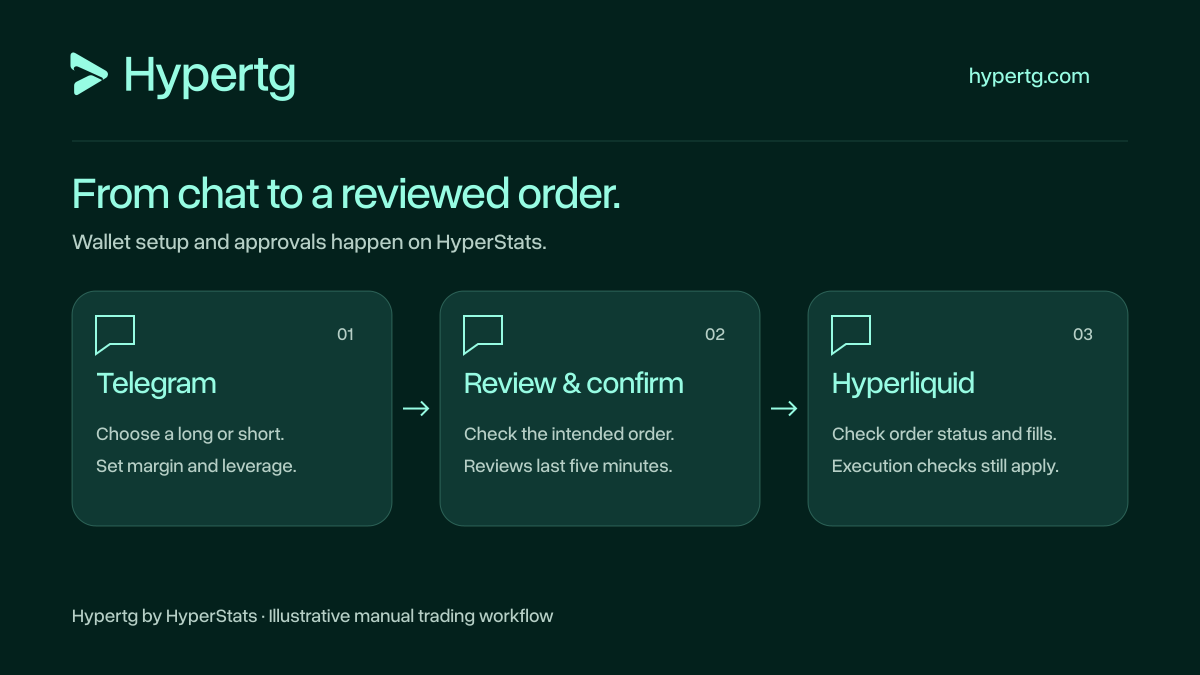
A Telegram perps bot opens and manages derivative positions from chat. Hyperliquid perpetual futures have no expiration date. In Hypertg, choose a long or short, specify margin and leverage, and review the order before confirming. Leverage increases exposure relative to margin, and positions can be liquidated.
Protocol referenceHyperliquid perpetual contract specifications - 03
Signal and copy trading bots
Signal automation turns a provider’s messages or alerts into orders. Wallet copy trading follows the activity of a selected wallet under your settings. Hypertg’s copy workflow uses a Hyperliquid wallet address, not a subscription to a signal channel. Before enabling automatic copying, check the selected wallet, copy margin and risk settings. Confirm which activity you are following and the size your own account will use.
Hypertg at a glance
What happens.
What you control.
Compare the actual workflows before connecting. Manual orders and enabled wallet copying use different confirmation rules.
| Workflow | How Hypertg works |
|---|---|
| Market and builder | Hypertg is an independent Telegram interface by HyperStats. Its documented long/short workflow opens Hyperliquid perpetual futures. LimitsPerpetual positions provide derivative exposure; this workflow does not purchase spot tokens. About Hypertg |
| Manual trades | In Hypertg, a /long or /short command creates an order review. Check the margin, leverage, wallet and estimates, then confirm within five minutes. Sending the command alone does not place the trade. LimitsA review needs your confirmation and remains subject to current account and execution checks. Manual trade reviews |
| Wallet copying | Enabled copy trading can execute under your saved settings without a separate confirmation for each copied entry. It follows selected Hyperliquid wallets, rather than Telegram signal channels. Fills and results can differ. LimitsChoosing copy margin enables copying. Review current risk settings before selecting the amount; available margin constrains execution. Copy trading controls |
| Take profit and stop loss | Review and confirm a new TP/SL trigger or an update to an existing level. An update is still subject to exchange confirmation; check Orders when its status is unclear. A trigger price does not guarantee a fill price. LimitsProtection controls apply to an existing position. A reviewed trigger or update is not proof of exchange acceptance or execution. Position protection |
| Wallet authority | Hypertg uses approved Hyperliquid trading authority for trades and position management. Trades can lose money or result in liquidation. LimitsWallet connection and approval review happen on Hypertg. The trading permission does not allow withdrawals. Understand permissions |
| Pausing and revoking | Confirming /disconnect pauses manual trading and copying for the selected trading account. Removing trading authority requires revoking the relevant agent approval. Neither action automatically closes existing positions or cancels every exchange order. LimitsA bot pause and agent revocation change different access controls. Manage existing exposure and orders separately. Pause versus revoke |
Website previews are simulations. Actual execution depends on account permissions, settings and market conditions.
Trading terms, explained
Know the terms.
Read the trade.
Six terms you’ll meet in a Hyperliquid Telegram trading bot. Understand the action, then follow the relevant Hypertg guide.
- Margin
Margin is collateral used to support a leveraged position. It is different from the total value of that position. Hyperliquid supports cross margin, which shares collateral across positions, and isolated margin, which assigns collateral to an individual position. Check the account and margin mode before trading.
Protocol referenceHyperliquid margin requirementsMargin in a Hypertg trade review- Position size (notional)
Notional is the value of a position, rather than the margin used to support it. In the illustrative Hypertg command /long BTC 25 5, $25 margin at 5× leverage gives an intended $125 position value. Check the actual size and execution details in the review and fills; this example is not a trade recommendation.
Protocol referenceHyperliquid margin requirementsRead the command example- Perpetual futures
Perpetual futures are derivative contracts without an expiration date. Hyperliquid perpetuals use funding payments to help the contract price track the underlying spot price. Opening a Hypertg perpetual position is different from buying a spot token.
Protocol referenceHyperliquid perpetual contract specificationsExplore Hypertg manual trading- Trading agent
A Hyperliquid trading agent is an approved API wallet that can sign permitted actions on behalf of an account. Hypertg’s approved trading access supports trading and position management, not withdrawals. Removing that authority requires revoking the relevant agent approval; pausing the bot is a separate action.
Protocol referenceHyperliquid API wallets and agent signingCompare pausing and revoking- Wallet copying
Wallet copying follows activity from a wallet address under the copying account’s settings. In Hypertg, enabled copying can execute without a separate confirmation for each copied entry. It follows selected Hyperliquid wallets, not Telegram signal channels. Your position sizes, fills and results can differ from the followed wallet.
Review wallet-copying controls- Order fill
An order fill is an execution of all or part of an order. Queued, submitted or accepted status alone is not proof of a fill. In Hypertg, use /orders for order status, /history for fills and /positions for open positions before retrying an unclear action.
Check an unclear order status
A message away
Commands to know.
Use a command or the bot’s buttons to open the workflow.
/startOpen Hypertg and follow the website setup link from your private chat.
/long BTC 25 5Create an illustrative BTC long review with $25 margin at 5× leverage.
/positionsCheck open positions and the controls for the position you intend to manage.
/copy 0xwalletOpen the copy workflow using the full Hyperliquid wallet address you select.
These examples explain the interface, not a suggested trade. A manual entry requires confirmation; enabled copy trading can act under your saved settings. Website previews are illustrative.
See all commandsUsing Hypertg on Hyperliquid
From setup
to your first review.
Hypertg is a Telegram crypto trading bot by HyperStats. Use browser signing or the bot’s /setup flow for a dedicated trading wallet. Your private Telegram chat is the interface for trading and managing the connected account.
Connect through the website
Open @hypertgcombot and send /start. Follow the personal login link from your private chat to hypertg.com/login/. Check the selected wallet, add funds if needed, and review the trading permission and applicable bot fee. Confirm your exact wallet address in Telegram before approving trading access and the applicable fee. Do not send your seed phrase or main-wallet private key in chat.
Follow the full setup walkthroughReview a manual trade
Use the trading buttons or /long BTC 25 5. Here, 25 means $25 margin and 5 means 5× leverage: the intended position size is $125. This is an example of command syntax, not a recommendation. Check the wallet, coin, direction, size and estimated fees. The command creates a review, not an immediate trade. Confirm only the intended action; entry reviews expire after five minutes.
Explore manual trading and confirmationRead the execution result
Hypertg reviews contain estimates; final Hyperliquid fills, fees and execution can differ. A queued or submitted response is not confirmation of a fill, and Telegram can fail to deliver a message after an order was accepted. Use /orders for order status, /history for fills and /positions for open positions before retrying. Sending another order without checking can create an unintended second action. Website chat previews are illustrative and never submit an order to Hyperliquid.
Understand order status and expired reviewsManage the open position
Select the intended position in /positions. Use its controls or /tp and /sl to review new take profit and stop loss or update an existing level. Confirm the intended trigger. Check /orders if an update is still confirming before requesting another change. Use /close for a partial or full close review. A stop loss does not guarantee a fill price. Pausing or disconnecting leaves existing positions open.
Read about position controlsSet up wallet copying
A Telegram copy trading bot can follow selected wallets, but the resulting positions are still yours. In Hypertg, use /copy with the full Hyperliquid wallet address, then check current risk settings and available margin before choosing copy margin. Choosing the amount enables copying. Your settings and execution conditions can produce different sizes and fills from the followed wallet. Pausing copying does not automatically close its existing positions.
Understand Hyperliquid wallet copy tradingUnderstand trading authority
Hypertg’s approved trading permission allows supported trades and position management, but not withdrawals. That authority still carries risk because trades can lose money. Confirming /disconnect pauses manual trading and copying for the selected trading account; removing authority requires revoking the relevant agent approval. Review positions and orders separately when changing permissions.
Product guide · Hypertg by HyperStats · Updated
Before your first trade
Good questions.
Clear answers.
Manual trades, automated copying and the access a bot needs.
Does a Telegram trading bot trade automatically?
It depends on the workflow. In Hypertg, a manual long or short creates a review that you must confirm. Enabled wallet copying can execute under your saved copy and risk settings. A Telegram interface alone does not tell you whether a product uses manual confirmation, signals or automated strategies.
Link to this answer: Does a Telegram trading bot trade automatically?Can I trade crypto on Telegram without buying a spot token?
A Telegram perpetuals trading bot can give you an interface for derivative positions. Hypertg supports Hyperliquid long and short perpetual positions, which are different from buying a spot token. Review the market, margin, leverage and execution details before confirming.
Link to this answer: Can I trade crypto on Telegram without buying a spot token?Are all Telegram crypto trading bots safe to connect?
Access and custody arrangements differ by product. Check the website, wallet, signing authority and removal controls before approving access. Hypertg’s approved trading permission cannot withdraw funds, but it can open and close positions. Trading can lose money, and removing access does not close positions already open.
Link to this answer: Are all Telegram crypto trading bots safe to connect? Hypertg.